

IsThereAnyDeal Guide 2026: How to Track Historical Lows, Sync Wishlists and Save Big
Topical Hub: This guide is part of our comprehensive PC Gaming Deals & Digital Storefront Hub at Velogamer. Enhance your digital savings strategy with our sister deep dives on Steam Summer Sale Best Deals, How to Redeem Steam Keys, and Steam vs GOG Storefront Analysis.
For PC gamers, paying full manufacturer’s suggested retail price (MSRP) is virtually optional. With dozens of legitimate digital retailers operating across the globe, video game prices fluctuate continuously. However, manually checking dozens of storefronts every morning to see if a game on your radar has dropped in price is an exhausting, inefficient chore. Enter IsThereAnyDeal (ITAD): the undisputed gold standard of video game price aggregation, historical discount tracking, and automated deal notifications.
Unlike basic coupon scrapers or shady grey-market listing sites, IsThereAnyDeal aggregates pricing exclusively from verified, publisher-authorized digital storefronts—including Steam, GOG, Epic Games Store, Green Man Gaming, Fanatical, and Humble Bundle. By tracking all-time low price histories, calculating voucher code discounts, monitoring bundled packages, and syncing directly with your Steam and GOG wishlists, ITAD empowers gamers to save hundreds of dollars annually with zero manual effort. In this definitive 2026 guide, Velogamer provides an exhaustive walkthrough of IsThereAnyDeal, detailing account setup, custom alert configurations, browser extensions, and advanced power-user tactics.
⚡ Quick Answer: What Is IsThereAnyDeal and How Does It Work?
IsThereAnyDeal (ITAD) is a free, publisher-authorized price comparison engine that tracks PC game discounts across more than 35 official digital retailers. By linking your Steam or GOG account, ITAD imports your existing wishlist, monitors historical price floors (All-Time Lows), factors in retailer promo vouchers, and automatically emails you custom alerts when games hit your target price threshold or DRM preference (e.g., Steam key vs. DRM-free GOG).
💡 Key Takeaways for Smart Deal Hunters
- 100% Authorized Retailers: ITAD tracks only verified, publisher-approved stores, completely filtering out fraudulent keys and unauthorized grey-market sellers.
- Automated Wishlist Synchronization: Syncs seamlessly with Steam, GOG, and Epic Games via official public API endpoints to update your personal Waitlist automatically.
- Historical Low Benchmarking: Features interactive price history graphs dating back over a decade, distinguishing genuine all-time low prices from routine marketing markdowns.
- Custom Notification Triggers: Allows granular alert rules based on specific dollar price points, percentage discounts, DRM client requirements, or bundle inclusions.
- Augmented Steam Synergy: Pairs with the Augmented Steam browser extension to inject real-time ITAD historical pricing and current best deals directly into the native Steam store web interface.
Table of Contents
- What Is IsThereAnyDeal and Why It Dominates PC Price Tracking
- Authorized Retailers vs. Grey-Market Key Resellers
- Step-by-Step Account Setup & Library Synchronization
- Mastering the ITAD Waitlist & Custom Price Alerts
- Deciphering Price History Graphs & Historical Lows
- Supercharging ITAD with the Augmented Steam Browser Extension
- Tracking Bundles, Subscriptions & Free Giveaways
- Deal Tracking Platform Comparison Matrix
- Pro Tips & Advanced Best Practices for Power Users
- Common Mistakes to Avoid When Using IsThereAnyDeal
- Troubleshooting Sync Failures, Missing Alerts & Currency Errors
- Frequently Asked Questions (FAQ)
- Conclusion & Velogamer Recommendations
- Authoritative & Official Sources
What Is IsThereAnyDeal and Why It Dominates PC Price Tracking

IsThereAnyDeal (commonly abbreviated as ITAD) is an independent web application and price telemetry database created to bring total financial transparency to digital PC gaming. Founded over a decade ago, the service constantly polls the digital storefront APIs of legitimate video game distributors across multiple global currencies and geographic regions.
When you browse a game on ITAD, the platform displays not only the current price on Valve’s Steam client, but also real-time prices across competitors like GOG, Epic Games Store, Microsoft Store, Green Man Gaming, Fanatical, Humble Store, Gamesplanet, WinGameStore, and GameBillet. Crucially, ITAD calculates active retailer promo codes and discount vouchers automatically, displaying the true out-of-pocket price you will pay at checkout.
Authorized Retailers vs. Grey-Market Key Resellers

One of the foundational pillars of IsThereAnyDeal is its strict, non-negotiable policy regarding storefront legitimacy. In the digital gaming landscape, key distribution falls into two distinct categories:
- Authorized Retailers (Tracked by ITAD): Storefronts like Green Man Gaming, Fanatical, Humble Bundle, and Gamesplanet receive digital activation keys directly from publishers and developers under official contractual agreements. Every sale generates royalties for creators, and keys are guaranteed 100% authentic, secure, and immune to retroactive revocation.
- Grey-Market Resellers (Blocked by ITAD): Marketplaces like Kinguin or G2A operate open platforms where anonymous third-party sellers trade serial codes. These keys frequently originate from stolen credit cards, exploited regional currency disparities, or abused review copies. Using grey-market sites risks account flags, chargebacks, and deactivated game licenses.
By exclusively tracking authorized distributors, ITAD ensures that every transaction is safe, legal, and directly supports the studios developing the games you love.
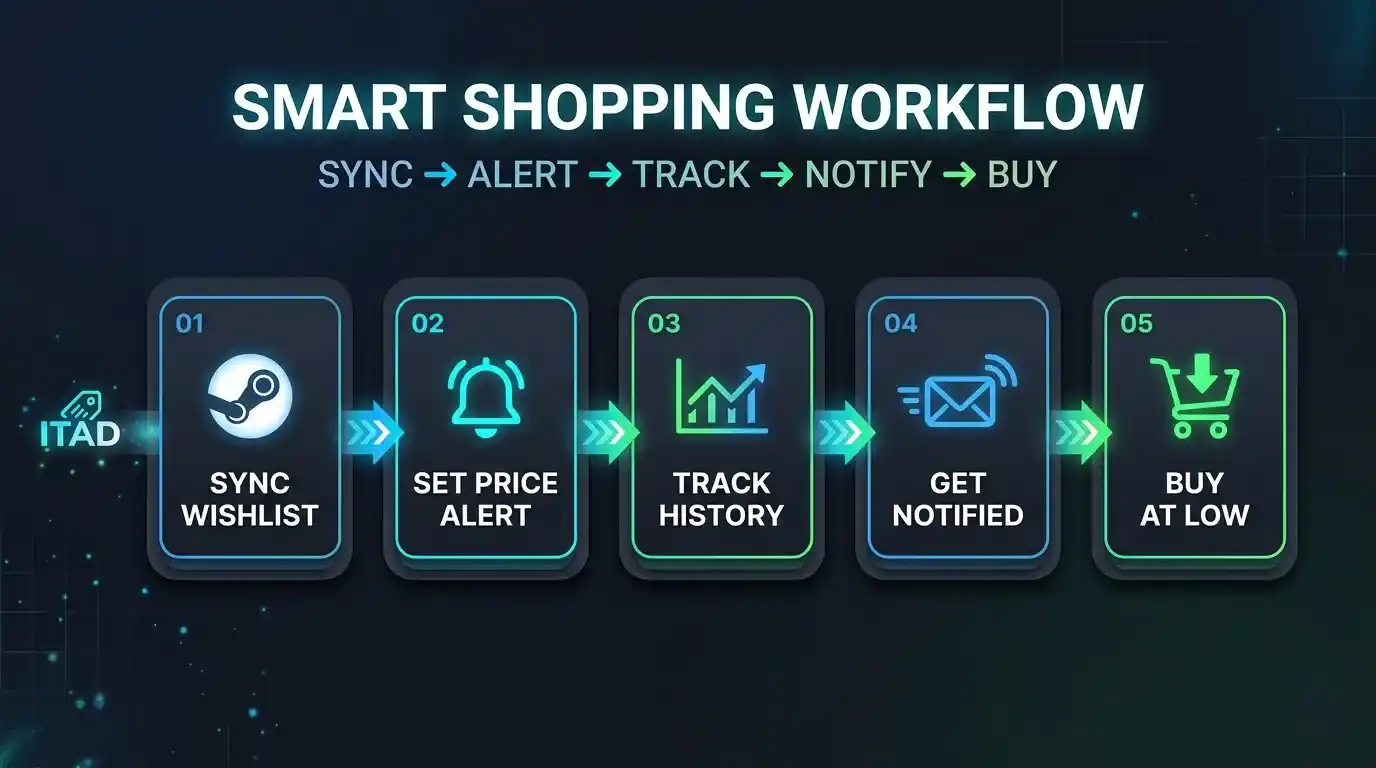
Step-by-Step Account Setup & Library Synchronization
While you can browse IsThereAnyDeal anonymously, the platform’s true power unlocks when you create a free account and connect your existing digital storefront profiles. Follow this step-by-step walkthrough to get started:
- Create Your Account: Visit the official IsThereAnyDeal website and click “Sign In / Register”. You can sign in directly through your Steam account using Valve’s secure OpenID authentication, meaning ITAD never sees or stores your Steam password.
- Connect Your Storefront Profiles: Navigate to your Account Settings > “Sync”. Here, you can link your Steam ID, GOG account, and Epic Games Store library.
- Import Your Wishlists: Once linked, click “Import Wishlist”. ITAD will scan your public Steam and GOG wishlists and automatically duplicate every tracked game into your ITAD “Waitlist”.
- Import Your Owned Games Collection: In the same sync menu, click “Import Collection”. ITAD indexes your entire library of owned titles. This is essential because ITAD automatically suppresses deal alerts for games you already own, preventing redundant notifications.
- Configure Regional Currency: Go to Settings > “Regional Settings” and select your local currency (USD, EUR, GBP, CAD, AUD, etc.) and preferred storefront regions to ensure price alerts reflect local pricing accurately.
Mastering the ITAD Waitlist & Custom Price Alerts
The core operational hub of IsThereAnyDeal is the Waitlist. Unlike a standard Steam wishlist that merely emails you when any generic discount occurs, ITAD allows surgical control over notification criteria:
- Price Threshold Rules: You can set alerts to trigger only when a game drops below a specific price (e.g., “Alert me only when Cyberpunk 2077 drops below $19.99″). Review our guide on Best PC Games Under $20 for benchmark target prices.
- Percentage Discount Thresholds: Set triggers based on discount depth (e.g., “Notify me when discount reaches 75% or higher”).
- Historical Low Triggers: Choose “Only alert me if price equals or beats the All-Time Low (ATL)”. This guarantees you never buy on a mediocre 20% discount when the game routinely drops by 60%.
- DRM Preference Filtering: If you only play on Valve’s portable console configured via our Steam Deck Setup Guide, you can configure your alerts to only notify you when the deal provides a redeemable Steam key, completely ignoring Epic Games or Ubisoft Connect keys. Conversely, if you prefer offline preservation, you can restrict alerts to DRM-free GOG installers (see our Steam vs GOG Comparison).
Deciphering Price History Graphs & Historical Lows
Every individual game listing on IsThereAnyDeal contains a rich data visualization section known as the Price History Chart. Understanding how to interpret this graph protects you from misleading retail promotions:
- The Base Price Line: Tracks the game’s standard MSRP over time, highlighting whether a publisher recently inflated the base price prior to a major seasonal promotion.
- The Recorded Low (Historical Low): Displays the single lowest price ever recorded for the game across all authorized storefronts since launch, including the date and specific store that hosted the deal.
- Recent Price Dips: Visualizes seasonal price cycles. Most AAA and indie titles experience recurring discount valleys during the Steam Summer Sale and Steam Winter Sale. If the graph reveals a game discounts every six weeks, you should never buy it at full price.
Supercharging ITAD with the Augmented Steam Browser Extension
For the ultimate seamless experience, pair IsThereAnyDeal with Augmented Steam, a free open-source browser extension developed directly by the ITAD team (available for Google Chrome, Mozilla Firefox, and Microsoft Edge). Once installed, Augmented Steam injects ITAD’s pricing engine directly into the standard web version of the Steam store:
- Instant Best Price Callout: Directly above Steam’s “Add to Cart” button, Augmented Steam displays the current lowest price across authorized stores and indicates whether buying externally via a digital code offers superior savings.
- Historical Low Badge: Directly shows the game’s all-time record low price and how many months ago it occurred.
- DRM & Regional Warning Banners: Flags games that require third-party launchers (EA App, Ubisoft Connect) or intrusive anti-cheat software (Denuvo).
- Quick Key Activation: Includes quick-links to redeem purchased keys. Learn the step-by-step redemption process in our walkthrough on How to Redeem Steam Keys.
Tracking Bundles, Subscriptions & Free Giveaways
Beyond individual title discounts, IsThereAnyDeal features dedicated tracking engines for package deals and promotional giveaways:
- Bundle Tracking: ITAD tracks live bundles from Humble Bundle, Fanatical, and IndieGala. The engine checks the games included in each bundle against your imported collection and calculates the exact value of the titles you do not yet own.
- Free Game Alerts: The platform tracks 100% free promotional giveaways from the Epic Games Store, Steam, GOG, and Prime Gaming, ensuring you never miss a permanent zero-dollar addition to your library.
- Subscription Catalog Indexing: ITAD indexes software catalogs for subscription services such as Xbox Game Pass for PC and EA Play, notifying you if a game on your Waitlist is currently playable at no extra charge through an active subscription.
Deal Tracking Platform Comparison Matrix
The table below compares IsThereAnyDeal against other prominent video game pricing and database platforms across key feature categories.
| Platform | Primary Purpose | Stores Tracked | Key Sourcing | Wishlist Sync | Custom Price Alerts | Browser Extension |
|---|---|---|---|---|---|---|
| IsThereAnyDeal (ITAD) | Multi-Store Price Comparison & Alerts | 35+ Authorized Stores | 100% Authorized Only | Steam, GOG, Epic | Advanced / Granular | Augmented Steam |
| SteamDB | Steam Technical Telemetry & Pricing | Steam Client Only | Direct Steam Store | Steam Wishlist | Basic Discord / Email | SteamDB Extension |
| Deku Deals | Console & PC Price Tracking | Nintendo, PlayStation, Xbox, Steam | First-Party & Major Retailers | Manual Import | Moderate | None |
| AllKeyShop / GG.deals | Broad Key Comparison | Authorized + Grey Market | Mixed (Includes Unverified Keys) | Steam Sync | Moderate | Third-Party Extensions |
Pro Tips & Advanced Best Practices for Power Users
🚀 Power User Strategies
- Factor in Retailer Reward Programs: Storefronts like Green Man Gaming (XP Program) and Humble Store (Humble Choice Subscriber discount) offer additional compound cash-back incentives. In ITAD settings, you can check boxes indicating your membership tier to display bespoke personalized prices.
- Use the “Wait for Better” Setting: If a game released recently and is only discounted by 10%, configure your alert rule to trigger only when the discount matches the average historical discount curve for that publisher (e.g., 50% for Ubisoft or CD Projekt Red).
- Set Up Notification Digests: Instead of receiving twenty individual emails during major sales blowouts, configure your ITAD account to deliver a single daily morning digest consolidating all active triggers.
- Secure Your Primary Accounts: Because deal tracking involves purchasing from multiple authorized retailers, protect your primary client accounts with multi-factor authentication. Follow our step-by-step guide on Steam Two-Factor Authentication.
Common Mistakes to Avoid When Using IsThereAnyDeal
⚠️ Avoid These Configuration Errors
- Leaving Steam Privacy Settings on “Private”: ITAD relies on the public Steam API to read your wishlist. If your Steam profile or game details are set to “Private”, ITAD cannot sync your titles, resulting in blank Waitlists.
- Ignoring Currency Conversion Fees: If an authorized retailer operates in Euros or British Pounds and your bank charges foreign transaction fees, buying from an international store may negate minor price savings. Stick to storefronts offering native local currency billing.
- Failing to Verify DRM Delivery: Always confirm whether a deal delivers a Steam key, an Epic key, or an EA App code. Buying an Epic code when you intended to play on a Steam Deck can require extra launcher configuration steps.
Troubleshooting Sync Failures, Missing Alerts & Currency Errors
The table below provides straightforward resolutions for common technical issues encountered on IsThereAnyDeal.
| Problem / Error | Probable Cause | Recommended Solution |
|---|---|---|
| Steam Wishlist Fails to Sync | Steam Community Privacy settings configured to “Private” or “Friends Only”. | Open Steam > Profile > Edit Profile > Privacy Settings > Change “My Profile” and “Game Details” to “Public”. Then re-run the sync in ITAD. |
| Deal Alert Emails Not Arriving | Email provider filtering ITAD notification messages into Spam/Junk or Promotions folder. | Add @isthereanydeal.com to your email whitelist / safe senders list. Verify notifications are enabled under ITAD Account > Settings > Notification Methods. |
| Voucher Code Not Applying at Checkout | The retailer promo code expired, or publisher opted out of site-wide promotions. | Check the terms on the retailer’s product page. Certain publishers (like Nintendo, Sony, or Bandai Namco) frequently exclude select titles from external promotional coupons. |
| Prices Showing in Wrong Currency | IP geolocation misinterpreting regional location or active VPN connection. | Disable VPN. Go to ITAD Settings > Regional Settings > Manually set Country and Preferred Currency. |
| Augmented Steam Not Displaying on Web | Browser extension permissions disabled for store.steampowered.com domain. | Check browser Extensions manager > Augmented Steam > Details > Ensure “Site Access” is set to “On all sites” or specifically enabled for Steam. |
Frequently Asked Questions (FAQ)
Is IsThereAnyDeal completely free to use?
Yes. IsThereAnyDeal is 100% free for all users. The service generates revenue through affiliate links when users click through to authorized retailers and complete qualifying purchases, with zero added cost to the consumer.
Are all storefronts on IsThereAnyDeal safe and legitimate?
Yes. ITAD strictly tracks authorized, publisher-approved digital retailers (such as Steam, GOG, Epic Games Store, Green Man Gaming, Fanatical, and Humble Bundle). It completely excludes grey-market reseller marketplaces to protect users from revoked or fraudulent keys.
Does IsThereAnyDeal steal or store my Steam password?
No. ITAD uses Valve’s official OpenID protocol for Steam authentication. You log into the official Valve Steam server directly, which merely returns a secure cryptographic verification token to ITAD. ITAD never sees or stores your password.
How do I get my Steam wishlist to show up on IsThereAnyDeal?
First, ensure your Steam Community Profile and Game Details privacy settings are set to “Public”. Then, log into ITAD, navigate to Account Settings > Sync, and click “Import Wishlist”. ITAD will automatically duplicate your tracked games into your ITAD Waitlist.
Can IsThereAnyDeal alert me only when a game gives a Steam key?
Yes. When configuring rules for your Waitlist or individual titles, you can set the “DRM” filter specifically to “Steam”. ITAD will then ignore sales from storefronts that deliver Epic Games Store, Ubisoft Connect, or GOG keys.
What is the difference between IsThereAnyDeal and SteamDB?
SteamDB monitors technical telemetry, concurrent player counts, and historical prices solely within Valve’s direct Steam client storefront. IsThereAnyDeal, by contrast, compares prices across more than 35 distinct external authorized retailers and calculates promotional coupon codes.
What is Augmented Steam?
Augmented Steam is a free browser extension maintained by the IsThereAnyDeal team. It injects ITAD historical price data, all-time lows, third-party deal alerts, and DRM warning banners directly onto the official Steam web storefront.
Can I receive price alerts via email or Discord?
Yes. ITAD supports multiple notification channels, including automated instant email alerts, consolidated daily email digests, and automated notifications sent directly to a private Discord channel via webhooks.
How do I redeem a key I bought from an ITAD retailer on Steam?
In your Steam client, click “Games” in the top menu, choose “Activate a Product on Steam…”, and enter the alphanumeric product code provided by the retailer. For complete instructions, review our tutorial on How to Redeem Steam Keys.
Can ITAD track console games for PlayStation, Xbox, or Nintendo Switch?
No. IsThereAnyDeal is dedicated exclusively to digital PC gaming (Windows, macOS, Linux/Steam Deck). For console price tracking, specialized platforms like Deku Deals serve a similar role.
Conclusion & Velogamer Recommendations
IsThereAnyDeal is the single most powerful tool in any PC gamer’s arsenal. By automating price monitoring across verified authorized distributors, indexing all-time low price histories, and eliminating grey-market fraud risks, ITAD ensures you never spend more than necessary on your digital library.
Pair ITAD’s automated price tracking with the Augmented Steam browser extension, and you will transform how you purchase games forever. Before expanding your digital collection during the next promotional event, explore our complementary guides on Best PC Games Under $10, Best Cheap PC Games Under $5, and Steam Summer Sale Best Deals to extract maximum value from every dollar spent.
Related Velogamer Guides & Resources
Authoritative & Official Sources
In accordance with Velogamer’s editorial integrity guidelines, all platform policies, technical APIs, and storefront practices cited in this guide reflect verified documentation from official industry authorities:



Pingback: GOG vs Steam (2026): Which Platform Has Better Deals?